Description:
Dubya Cattle Co. Cab HUD for Farming Simulator 25
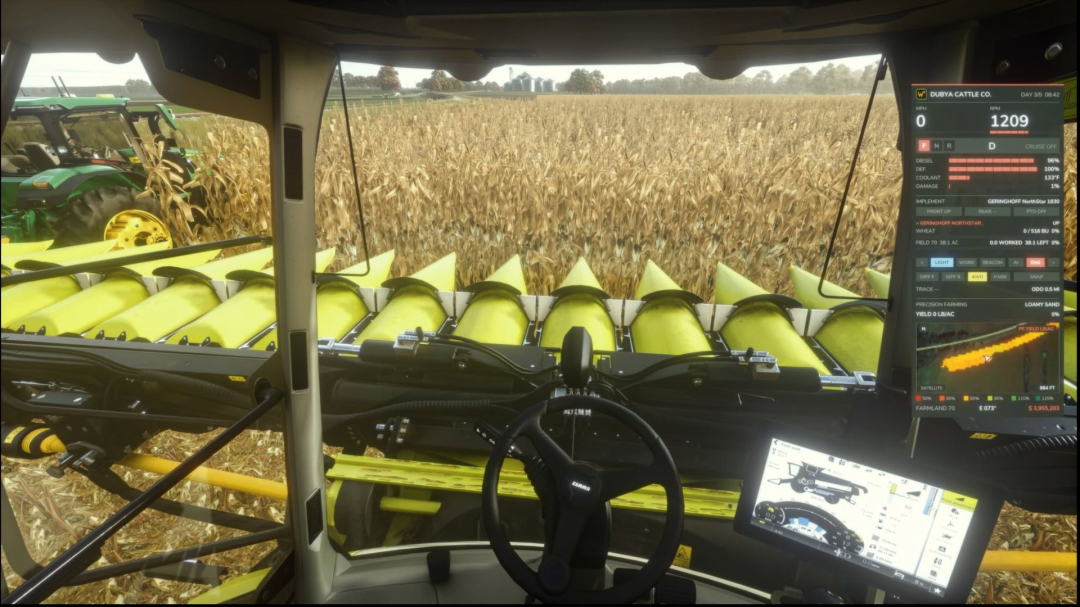
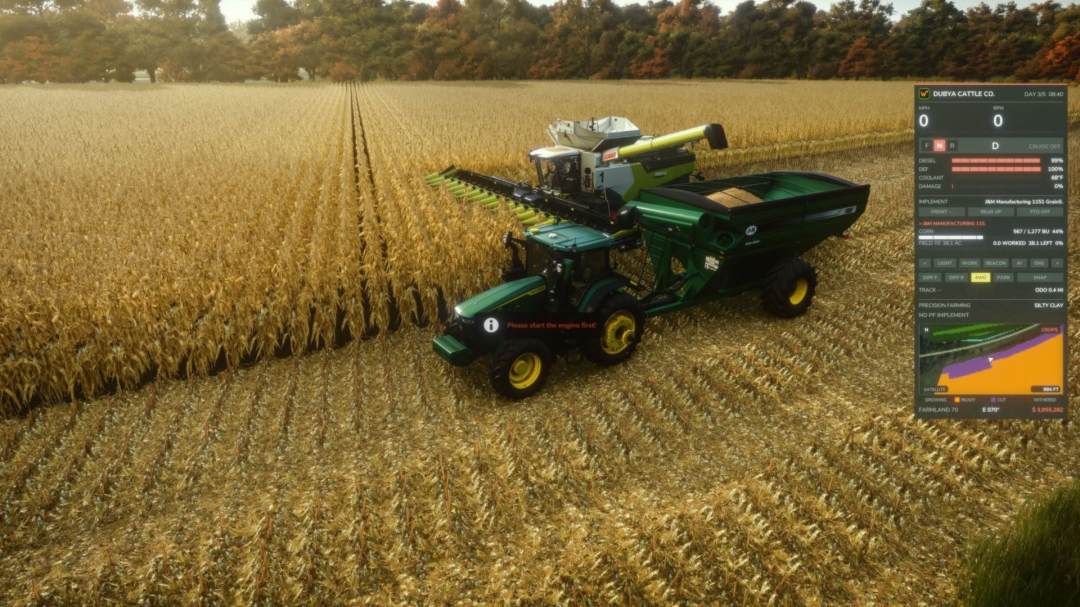
A comprehensive in-cab dashboard panel that consolidates all essential information into a clean, movable, and resizable window. It displays speed, engine status, fuel levels, implement details, Precision Farming data, a live mini map with field layers, and a 5-day weather forecast—all without opening any menus. The panel appears when you're in a vehicle and hides when you exit. It’s client-side, functioning in single-player, multiplayer, and dedicated servers, with each player customizing it to their preference.
What the panel shows
Dubya Cattle Co. logo
In-game day and time
Driving and engine info
Speed (MPH) and RPM with bar gauges
Direction (Forward / Neutral / Reverse), current gear, and cruise control speed
Fuel type (Diesel/electric/methane), DEF level, coolant temperature in °F, and damage status
Damage indicator reflecting the worst damage across the tractor and attachments, labeled "DMG IMPL" when an implement is most damaged
Implement list (similar to control group HUD)
All attached implements, including those connected to others, listed with front or rear position
Highlighting the selected implement
Status indicators for raised/lowered, folded/open (for foldable implements), and powered-on
PTO on/off
Acres worked and remaining
Details of the current field: size in acres, acres worked, acres left, and completion percentage with a progress bar. Counts actual worked area in single-player or when hosting, avoiding double counting of overlaps. On dedicated servers, it estimates based on working width and distance, marked "EST". Each field and implement set has its own counter, resetting for new jobs.
Fill tanks
Displays up to four tanks across the tractor and implements, such as seed and fertilizer tanks on seeders or front tanks.
Each tank shows fill type, current amount, capacity, and percentage with a bar; empty tanks are named after their contents.
Bars turn amber at 20% and red at 10%.
Lights and status indicators
Indicators for turn signals, headlights, work lights, beacon, AI helper, and engine status.
Enhanced Vehicle support (optional)
If the Enhanced Vehicle mod is active, an additional section displays:
- Front and rear diff locks, 2WD/4WD/FWD modes, and parking brake
- Steering snap angle, track number, work width, and headland distance
- Odometer and trip meter
Precision Farming support (optional)
When installed, the panel shows:
- Soil type beneath your tractor
- Sprayers and spreaders: pH or nitrogen levels, current and target values, application rate, and mode (auto/manual)
- Seeders: seed rate, mode, and tramline width
- Combines: yield in t/ha and yield potential percentage
Mini map
Three views accessible via Right Ctrl + Y: 2D north-up, 2D heading-up (map rotates with your direction, with a red N indicating north), and a live 3D chase view from above and behind the tractor.
- North-up map using your farm’s overview image, with an arrow indicating heading.
- Four zoom levels: 300 m, 600 m, 1.2 km, and 2.4 km.
- Field layers with color coding and a legend:
- Field Work: plowed, cultivated, stubble tillage, seedbed
- Crops: growing, ready to harvest, harvested, withered
- Fertilized: fertilizer levels (or PF Nitrogen if Precision Farming is active)
- Needs Work: lime, plowing, or rolling required
- Weeds: weeds and stones
- Soil types, pH, nitrogen, yield, and seed rate (from Precision Farming)
- Layers refresh every 15 seconds for real-time updates.
- Five map styles: Standard, Satellite, Topo (with grid), Dark, Night.
Weather forecast
Displays today plus the next four days with weather icons indicating expected conditions during working hours.
High and low temperatures in your game’s °F or °C setting.
Weather events like rain, storms, hail, and snow highlighted in amber.
Footer
Shows farmland number, compass heading in degrees, and your farm’s current money.
Customization
- Modern layout (default): rounded cards, an arc-style RPM gauge around the speed readout, slim pill gauges, and pill-shaped buttons. The classic layout can be toggled with a key.
- Move the panel to preset positions or freely drag it with the mouse.
- Resize via hotkeys or by dragging the bottom-right corner.
- Ten color themes plus a customizable theme via the settings file.
Adjustable background opacity
- Enable or disable sections: Enhanced Vehicle, Precision Farming, map, forecast.
- Solo mode hides the game’s HUD, leaving only this panel visible for a cinematic cab view. The Enhanced Vehicle guide lines and track numbers remain visible. The game HUD reappears upon exiting the vehicle.
- All settings save automatically to modSettings/FS25_DubyaHUD.xml.
Controls
- All keys use Right Ctrl and can be remapped in Options ? Controls under "Dubya HUD".
- Key functions include toggling the panel, changing views, resizing, switching themes, toggling sections, and adjusting the map.
- Mouse controls allow dragging to move or resize the panel.
Installation
- Place FS25_DubyaHUD.zip into your mods folder (Documents/My Games/FarmingSimulator2025/mods). Do not unzip.
- Enable the mod when starting or creating a save.
- For dedicated servers, upload the zip to the server’s mods folder and activate it.
- The panel appears automatically when entering any vehicle.
Compatibility
- Functions independently. Optional mods like Enhanced Vehicle and Precision Farming add sections but are not required.
- Other HUD mods, such as AutoDrive or Courseplay, are unaffected by solo mode.
- Troubleshooting: check log.txt for lines starting with "DubyaHUD" if issues arise.


 58.93 KB



Comments:
Login to place a comment: Login