



Contract Boost v1.1.0.0


3
Your rating:
All credits go to Courseplay devs
 3.81 MB
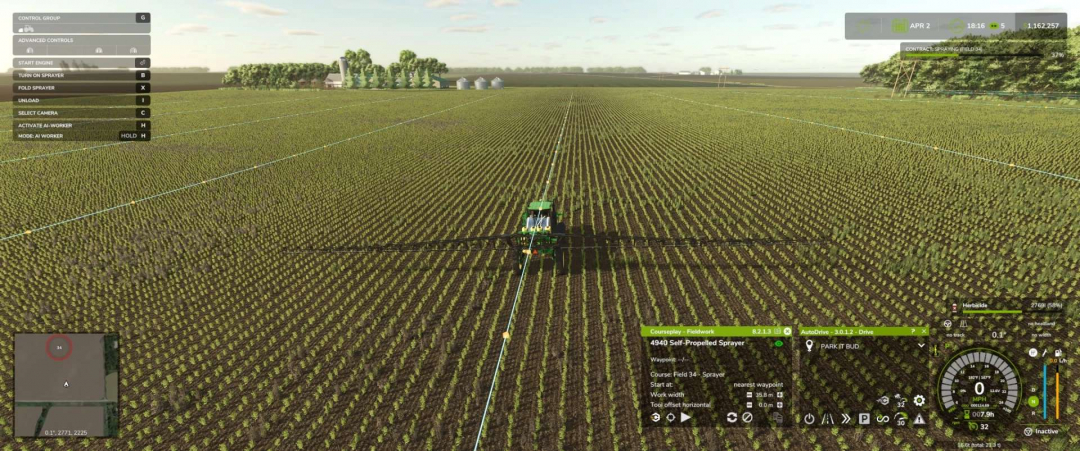
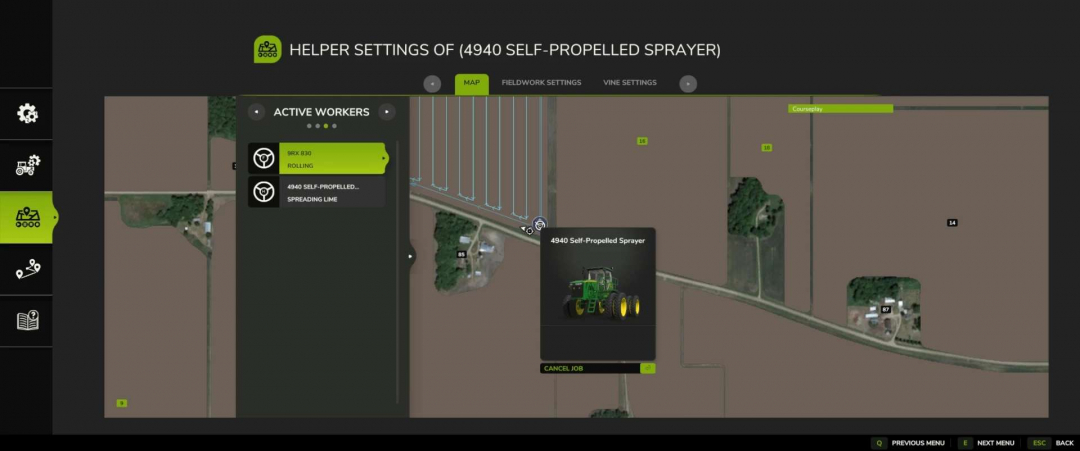
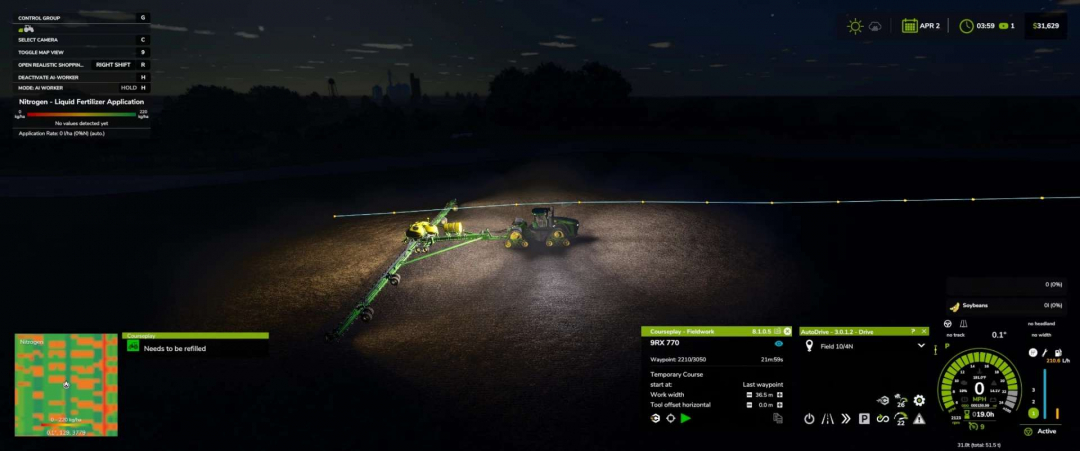
Unofficial Courseplay FS25 Custom Build Changelog Current custom build: 8.3.0.1 **VERSION / CORE CLEANUP** – Fixed a fieldwork turn-state logic issue that could affect turn handling. – Bumped custom version through the project, ending at 8.3.0.1. – Cleaned up older/incorrect references from the base mod. – Removed/avoided duplicate Lua registration issues. – Fixed vehicle configuration XML issues, including bad offset naming and duplicate entries. – Updated visible FS22-style text/references where they were showing incorrectly in the FS25 build. **MAJOR HUD OVERHAUL** – Reworked the Courseplay mini HUD into a cleaner style layout. – Kept the Courseplay green/black color theme. – Added a cleaner title bar: – Courseplay – Fieldwork – Courseplay – Unload Combine – Courseplay – Silo Work – Moved version number to the top-right of the HUD. – Removed visible CP: prefixes from HUD text where possible. – Enlarged and cleaned the vehicle name row. – Added/realigned the eye/course visibility icon. – Cleaned divider lines and spacing. – Improved font sizes and alignment. – Fixed long vehicle names so they trim cleaner instead of overflowing. – Rebuilt the bottom action row so buttons stay in a consistent order: 1. Courseplay/settings, Field target / crosshair 2. Play, Record or next/unload-now, Pause / reverse / recycle, Clear 3. Clear copied course cache, Copy generated course – Made buttons larger and easier to click. – Fixed overlapping/non-clickable button issues. – Moved all main action buttons to the bottom. – Kept copy-generated-course button available. – Added/cleaned the copied-course cache clear button. – Changed the unload-combine “next” icon scaled/positioned cleaner. – Prevented hidden buttons from remaining clickable underneath visible buttons. – Fixed HUD movement so it cannot be dragged while locked. – Fixed a bug where dragging the HUD moved the background but left buttons/text behind horizontally. – HUD position now moves as one unit. – HUD position/state is saved better. – Added HUD open/closed persistence. – If the HUD was open when saving, it should reopen after loading. – If it was closed when saving, it should stay closed. – Saved HUD position is retained. **FIELDWORK HUD TEXT CLEANUP** – Cleaned fieldwork HUD labels and values: – Waypoint: 1530/3050 – Start at: last waypoint – Start at: nearest waypoint – Start at: first waypoint – Work width – Tool offset horizontal – Added the missing space after Waypoint:. – Fixed course display states: – Course: temporary – Course: (none) – Course: Field 8 – Spreader – Current intended behavior: – If a course has a field, show: – Course: Field 8 – Spreader – If multiple fields are detected, show: – Course: Fields 8, 9 – Spreader – If no field is detected, fall back to the course/tool name: – Course: Spreader – If no course is loaded: – Course: (none) – If a temporary/generated course exists but is not saved: – Course: temporary – Added redundancy protection so it should not show: – Course: Field 8 – Field 8 – Spreader **SAVED-COURSE FOLDER / PATH DISPLAY** – Added folder/path-aware course display. – Tried mapping folders like: – combine/field 8 – sprayer/field 8 – planter/field 8 – Later changed the preferred display to field-first format: – Course: Field 8 – Spreader instead of: – Course: Spread – Spreader **AUTO-GENERATED COURSE NAMES** – Added generated-course auto-name logic and bumped to 8.2.1.0 for that feature. – New auto-name style examples: – Field 8 – Spreader – Field 8 – Harvester – Fields 8, 9 – Mower **Design choices:** – No crop name included. – No fill type included. – Keeps the course reusable across crops/products. – Uses field number first. – Uses implement/tool type second. – Falls back to generic course/tool name if no field is detected. **COURSE GENERATOR / JOB MENU CHANGES** – Made Create Job bottom actions visible immediately on the map page. – Start Job / Generate Course should appear without needing to switch tabs first. – Cleaned labels in the job menu. – Removed visible CP: prefixes from some action text. – Improved bottom-action syncing across pages. **ACTIVE WORKERS MENU INSIDE COURSEPLAY** – Fixed selected worker index mismatch. – Fixed vehicle name mismatch. – Added better active worker descriptions. – Improved selected-row behavior. – Long worker names/descriptions trim cleaner. – Added detailed worker task text such as: – Planting – Seeding – Spraying – Spreading – Harvesting – Mowing – Baling – Unloading Combine – Bunker Silo Work – Loading Silo – Collecting Bales **BASE GAME ACTIVE WORKERS MENU INJECTION** – Added shared worker detail text so the base game Active Workers list can show clearer CP job descriptions instead of generic text like: – FIELD WORK – WORKING THE… – Expected examples: – Spreading Lime – Spraying Herbicide – Planting – Seeding – Harvesting – Unloading Combine – Collecting Bales **WARNING TEXT CHANGES** – Changed the center-screen unloader warning. – Old style: – CP: Unloader too far away from the field. – New style: – Unloader too far away! Move closer to target field or set a new target! – Also: – Removed the CP: prefix from the center warning. – Left this warning as a center-screen warning, not a persistent top-right game info message. **INFO TEXT / NOTIFICATION SETTINGS** – Added and refined an info-text display setting. – Current choices: – Deactivated – Courseplay HUD box (constant) – Warning popups only – Game info area (persistent) – Meaning: – Deactivated: no extra CP info box. – Courseplay HUD box (constant): CP info box stays visible. – Warning popups only: CP info box only appears temporarily for warnings. – Game info area (persistent): uses the game’s notification/info area. – Prevented duplicate stacked copies of the same message. – Keeps one active message alive while the problem still exists. – Clears it when the problem is fixed. – Rate-limited repeated updates. – Added context where possible: – 9RX 770 needs to be refilled with seed – 4940 Self-Propelled Sprayer needs to be refilled – 9RX 830 needs to be refueled – Limited persistent messages to actual stoppage/problem states. – Did not make normal status messages persistent. **NOTIFICATION SOUND SETTING** – Added setting: – Game info notification sound – Purpose: – Plays a sound once when a new warning starts. – Does not spam repeatedly while the same issue remains active. **AUTODRIVE REFILL / MODE FIXES** – Fixed the issue where AutoDrive refill/reload caused the Courseplay HUD to get stuck in the wrong mode. – Specifically: – Fieldwork jobs should stay on the Fieldwork HUD. – Sprayers/spreaders/planters should not remain in Silo Work after emptied/refill. – HUD now prefers the actual running CP job instead of a stale selected HUD mode. – After AutoDrive refill, restart should resume fieldwork instead of forcing the wrong page. – Restart after refill was adjusted toward last waypoint behavior instead of restarting from the beginning. **SILO WORK SEPARATION** – Kept actual Silo Work for bunker/silo jobs. – Fieldwork refill/reload should no longer be treated as Silo Work. – Lime spreading, spraying, planting, etc. should remain Fieldwork. **DEFAULT SPEED CHANGES** – Changed default speeds: – Turn speed default: 10 km/h – Reverse speed default: 10 km/h – That is about: 6.2 mph – Existing vehicles may keep saved values, but new/default settings use the new value. **TEXT / CAPITALIZATION POLISH** – Waypoint: kept uppercase. – Added spacing after Waypoint:. – Start at: kept uppercase. – Start values kept lowercase: – last waypoint – nearest waypoint – first waypoint – Course state labels cleaned. – HUD and menu text made more consistent overall. I want to thank the Courseplay dev team for a wonderful mod! Please donate to them!

Comments:
Login to place a comment: Login